
Blog ·
Docs AI Search: Prompting & Orchestration
Dive into the details of Toca's multi-layered retriever, carefully crafted prompt, and the LangChain orchestration that powers a fast, accurate RAG pipeline.
Part 2 of 2: prompting and orchestration.
In part 1, overview and indexing, we introduced Docs AI Search for Toca.io, a new feature arriving in Toca 8.1 that lets you ask questions about the platform’s documentation in plain English and get direct, sourced answers. That post covered the foundation: pulling together docs from multiple sources, breaking them into manageable chunks, and indexing them with embeddings in Qdrant for fast semantic search.
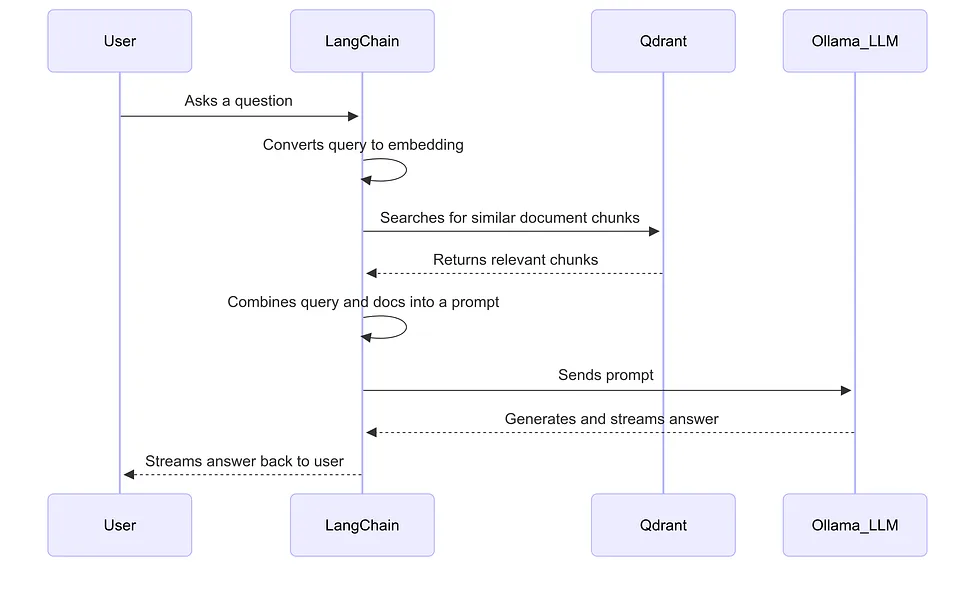
In part 2, we build on that foundation to bring the feature to life. We break down how we structure the prompts for our self-hosted Llama 3.1 model, manage conversation history for follow-up questions, and use LangChain to orchestrate the entire retrieval-augmented generation (RAG) pipeline, from user query to final answer.
For those who missed part 1: we’re sharing this behind-the-scenes look at our tech stack because the feature pushed us to explore some powerful open-source technologies. So, in the spirit of open source, we wanted to share some of our process and what we learned along the way.
The retriever: fetching the most relevant docs from Qdrant
With our documentation indexed in Qdrant, the first challenge for any user query is fetching the right docs. Semantic search is powerful, but relying on it alone can be risky. Sometimes the AI might miss critical information or fail to include foundational knowledge. To solve this, we built a custom CombinedRetriever with LangChain, which pulls documents from three different sources.
1. Semantic search 🔍
This is the core of our retriever. The user’s question is converted into an embedding and searched against the Qdrant index to find the most semantically similar document chunks. This is good enough for most queries. Semantic similarity is powerful, pulling back docs that are similar in meaning to the query rather than just containing the same words.
2. Keyword sources 🗝️
Some questions require specific documents to always be included, regardless of semantic similarity. For example, if a query contains the word “table”, we automatically inject our core Tables documentation.
This ensures the LLM always has the foundational knowledge it might otherwise miss. Because semantic search returns only a small number of results (under eight in our setup), this keyword layer acts as a safety net, guaranteeing critical documents are never left out. It wouldn’t be very helpful if the LLM knew eight different ways to pull data from a table, yet had no idea what a table actually is!
3. Default sources 🏗️
Some documents are so important that they should be included with every query. These default sources provide high-level context about the Toca platform, helping to anchor the LLM’s answers and align them with core concepts.
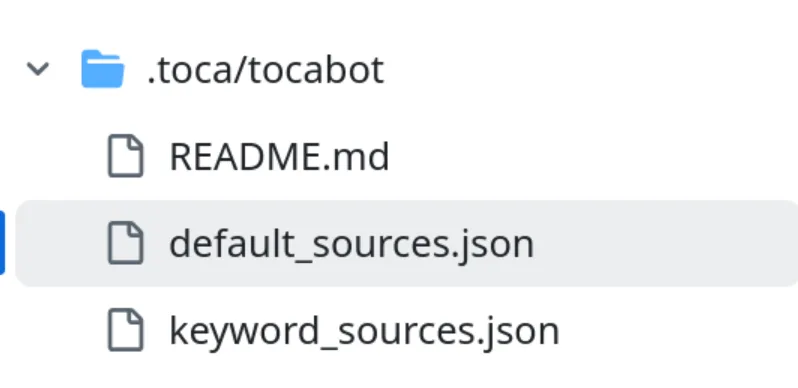
To keep this flexible and maintainable, our keyword and default sources are not hard-coded. They’re defined in simple JSON files stored alongside the documentation in the toca-docs repository, and the latest versions are loaded at runtime.
At a high level, the retriever looks like this:
from langchain_core.documents import Document
from langchain_core.retrievers import BaseRetriever

class CombinedRetriever(BaseRetriever):
    """
    A retriever that combines semantic search results
    with predefined default and keyword-based documents.
    """
    def __init__(self, semantic_retriever, default_docs, keyword_docs_map):
        super().__init__()
        self.semantic_retriever = semantic_retriever
        self.default_docs = default_docs
        self.keyword_docs_map = keyword_docs_map
    def _get_relevant_documents(self, query: str) -> list[Document]:
        # Use a set to keep track of added documents to avoid duplicates
        seen_docs = set()
        final_docs = []
        def add_docs(docs: list[Document]):
            """Helper to add documents to the final list while avoiding duplicates."""
            for doc in docs:
                if doc.page_content not in seen_docs:
                    final_docs.append(doc)
                    seen_docs.add(doc.page_content)
        # 1. Add default documents
        # These are always included to provide core context.
        add_docs(self.default_docs)
        # 2. Add keyword documents
        # Check if any keywords in the query match our predefined map.
        for keyword, docs in self.keyword_docs_map.items():
            if keyword in query.lower():
                add_docs(docs)

        # 3. Add semantic search results
        # Finally, add the results from the vector store search.
        semantic_results = self.semantic_retriever.get_relevant_documents(query)
        add_docs(semantic_results)
        return final_docs
The prompt
Getting the right docs to the AI is only half the battle. Without a carefully designed prompt, the AI doesn’t know how to use them. Crafting this prompt, one that keeps the model on task, avoids hallucination and handles edge cases gracefully, took the most trial and error of the whole project.
As we’re using LangChain, we used its PromptTemplate system to structure the prompt. A prompt template lets us combine instructions, context, examples and user input or message history in a way the AI can understand consistently. For Docs AI Search, we use ChatPromptTemplate, which is designed for chat-based models.
Defining the persona and core rules
First, we tell the model exactly what its job is. We establish its persona (“You are a helpful assistant for Toca.io”) and give it a clear set of rules to follow.
These rules are crucial for shaping the user experience, and include instructions like:
- Stick to the script: only use the provided documentation and background knowledge.
- Honesty is the best policy: if you can’t find an answer, say so clearly. Don’t make things up.
- Stay focused: avoid technical jargon like “context” or “retrieved documents”. The user just wants an answer, not a lesson in how RAG works.
- Use specific formatting: we enforce strict Markdown rules (bold for UI elements, hyphens for bullet points, no hyperlinks) so the output renders correctly in our UI.
Few-shot examples
Telling a model what to do is good, but showing it is even better. We included a set of few-shot examples directly in the prompt. They demonstrate exactly what a good response looks like in various scenarios:
- A simple comparison question (“What’s the difference between Activities and Workflows?”).
- A question requiring external but related knowledge (like providing a regex or JSONPath pattern).
- A question where the retrieved documents aren’t relevant, so it knows how to avoid giving an irrelevant answer.
- A loaded question trying to elicit a negative response.
These examples are a powerful way to guide the model’s tone, structure and refusals without lengthy, complex instructions.
Finally, the template combines all these static elements with the dynamic information for each query:
- System message: contains the persona, rules, background information and examples.
- History: the MessagesPlaceholder injects the previous turns of the conversation, making the chat feel natural and context-aware.
- Human message: we insert the {context} (the retrieved documents) and the user’s actual {input} question, instructing the model to answer based on everything it’s just been told.
This is what it looks like in code, though to handle all the edge cases and rules, the prompt itself is more like 2,500 words behind the scenes (!).
prompt = ChatPromptTemplate.from_messages(
    [
        # 1. The System Message: Contains the persona, rules, and background knowledge.
        SystemMessagePromptTemplate.from_template(
            """
            You are a helpful assistant for Toca.io...
            - Use the documentation to answer the question.
            - If you can't find an answer, say so.
            - Use **bold** for UI elements.
            - If you can't fully answer based on documentation, say:
             'I couldn't find everything on this topic, but here's what I can tell you.'
            - If there's nothing relevant, just say:
             'I couldn't find anything in the docs about this yet.'
            ...
            Here's some background on the Toca platform:
            {toca_background}
            """
        ),
        # 2. The Conversation History: Injects previous messages.
        MessagesPlaceholder(variable_name="history"),
        # 3. The Human Message: Provides the retrieved docs and the user's question.
        HumanMessagePromptTemplate.from_template(
            """
            Here are some relevant documentation excerpts:
            {context}
            Based on the above, please answer this user's message:
            {input}
            """
        ),
    ]
)
Orchestration: putting the parts together with LangChain
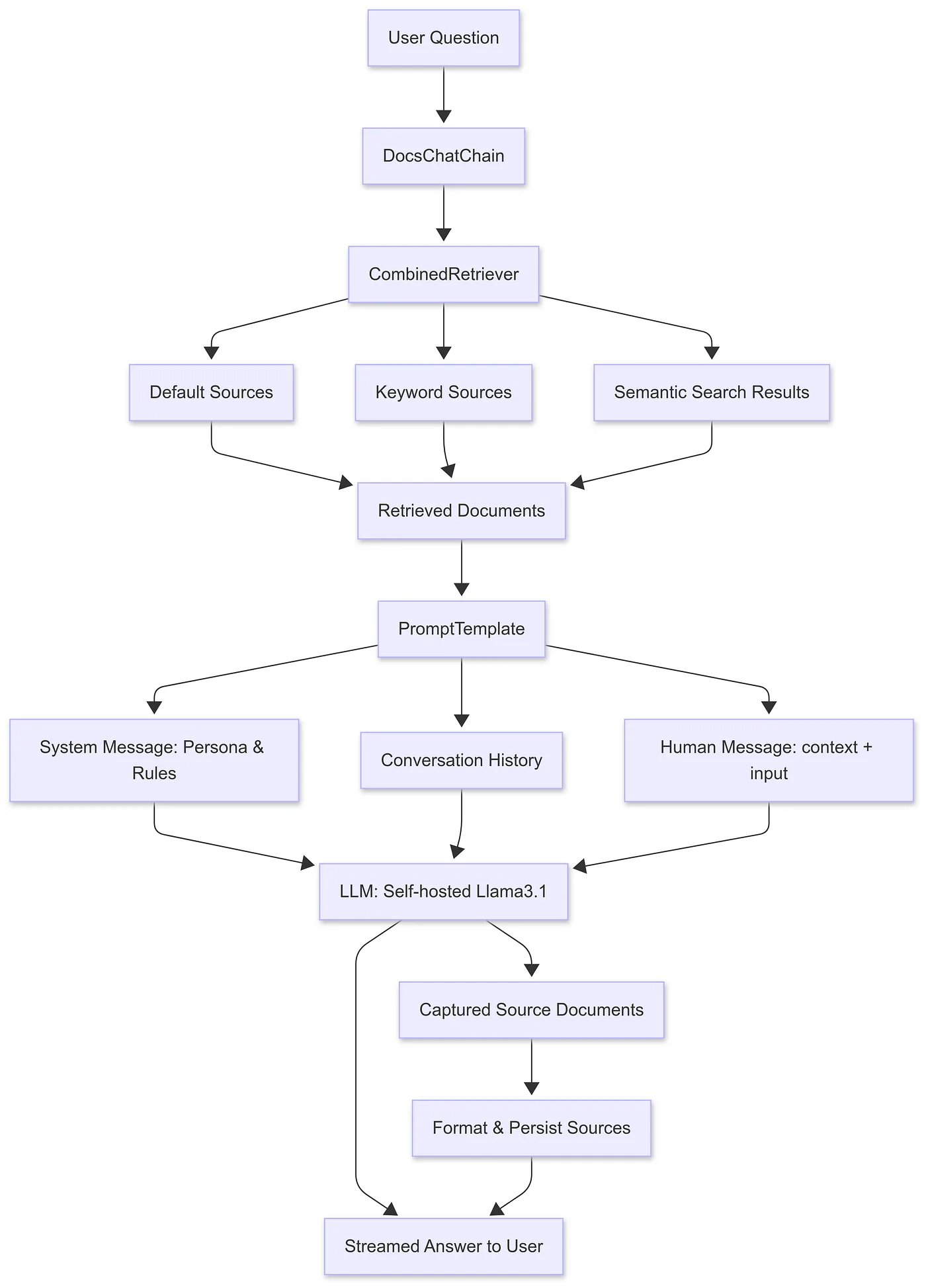
With document retrieval and prompt construction in place, we use LangChain to orchestrate the whole process. We wrapped this logic in a Python class, DocsChatChain, which uses two key LangChain components to manage the flow from a user’s question to the final, streamed answer.
LangChain provides powerful abstractions for building RAG pipelines. At the core of our implementation are two components.
First, create_stuff_documents_chain handles the core logic. It takes our prompt, injects the retrieved documents into the {context} variable, adds the user’s {input}, and passes the final, combined prompt to the LLM for generation.
Second, create_retrieval_chain wraps the entire process. It orchestrates the flow by first calling our CombinedRetriever to get the documents and then passing them to create_stuff_documents_chain.
Here’s how we set them up when initialising DocsChatChain:
from langchain.chains.combine_documents import create_stuff_documents_chain
from langchain.chains import create_retrieval_chain

# 1. Document combination chain - takes retrieved docs + prompt + user input
self.combine_documents_chain = create_stuff_documents_chain(
    llm=llm,
    prompt=prompt_template.PROMPT,
)
# 2. Full retrieval chain - retrieval + generation
self.rag_chain = create_retrieval_chain(
    combined_retriever,
    self.combine_documents_chain
)
Here, llm is an instance of OllamaLLM, initialised like this:
from langchain_ollama.llms import OllamaLLM

llm = OllamaLLM(
    model=config.LLM.MODEL_NAME,
    temperature=config.LLM.DOCS_CHAT.TEMPERATURE,
    streaming=True,
)
In our setup we’re using Llama 3.1, but any other Ollama model could be used. Alternatively, you could swap in a cloud provider like OpenAI or Gemini with the same setup.
Streaming the response
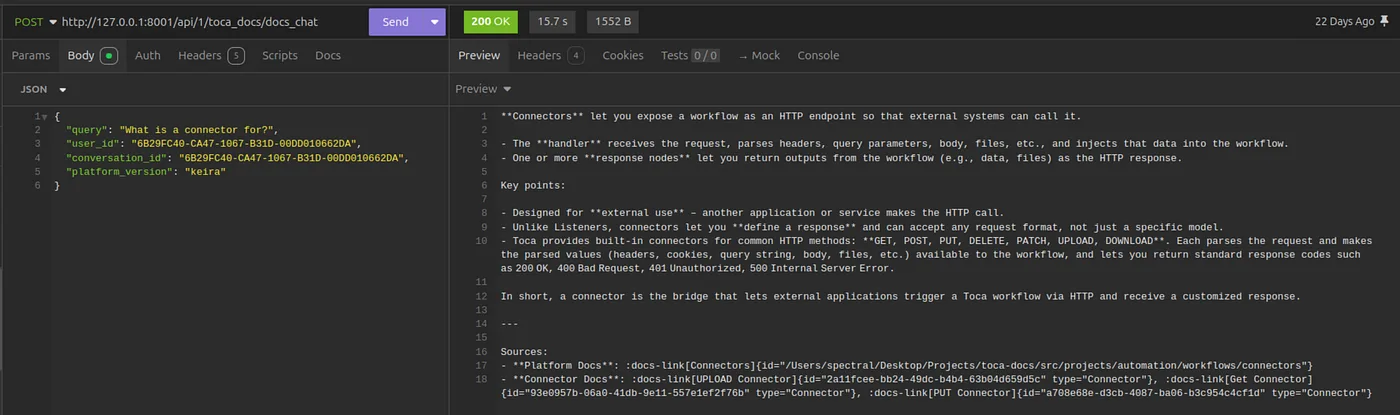
With rag_chain set up, we can now process a user’s question. We use the .astream() method to get a real-time, token-by-token response. This is essential for a good user experience, as the user sees the answer appear as it’s generated.
The stream yields different types of data. The very first chunk contains the {context}, the list of all the source documents our retriever found. Every subsequent chunk contains part of the {answer} as the LLM generates it.
Our code iterates through the stream, immediately sending each answer_chunk to the user. We capture the source documents from that first chunk and hold on to them until the full answer has been streamed.
We also check whether there have been any earlier messages from the user or the AI in the conversation, and pass them through if so, so that context is available.
from langchain.schema import BaseMessage

message_history: list[BaseMessage] = (
    self.conversations.get_conversation_messages(
        user_id, conversation_id
    )
)
inputs = {
    "input": user_question,
    "history": message_history,
}
async for chunk in rag_chain.astream(inputs):
    # First chunk contains the retrieved documents
    if chat_sources is None:
        chunk_sources = chunk.get("context", None)
        if chunk_sources:
            chat_sources = chunk_sources

    # Every chunk contains part of the answer
    answer_chunk = chunk.get("answer", "")
    answer += answer_chunk
    yield answer_chunk # Stream to the user immediately
Formatting and persisting the final output
Once streaming is complete, we process the chat_sources we captured. We clean the list up by removing duplicates and filtering out the default sources that are included in every query, so the user only sees the sources most relevant to their question. Finally, we format them as clean Markdown links and yield them as the last part of the response.
if chat_sources:
    # Remove any duplicate sources
    sources_without_duplicates = remove_duplicate_sources(chat_sources)
    # Remove any default sources (as we don't want them to appear every single time)
    sources_without_defaults = remove_default_sources(
        sources_without_duplicates,
        self.sources.get_default_sources(platform_version),
    )
    # Format them as markdown links
    formatted_sources = format_sources(sources_without_defaults)

    if len(formatted_sources) != 0:
        # If there's any sources - return them
        yield f"\n\n---\n\nSources:\n{formatted_sources}"
We then persist the conversation message (for a limited time), so the conversation history can be used for back-and-forth conversations:
from langchain.schema import HumanMessage

self.conversations.add_conversation_message(
    user_id, conversation_id,
    HumanMessage(content=user_question)
)
And that’s it. The final, formatted response stream from DocsChatChain.run() is ready to be consumed by our backend API (using a FastAPI StreamingResponse) and sent directly to the user’s browser, completing the loop from query to answer.
Tying it all together
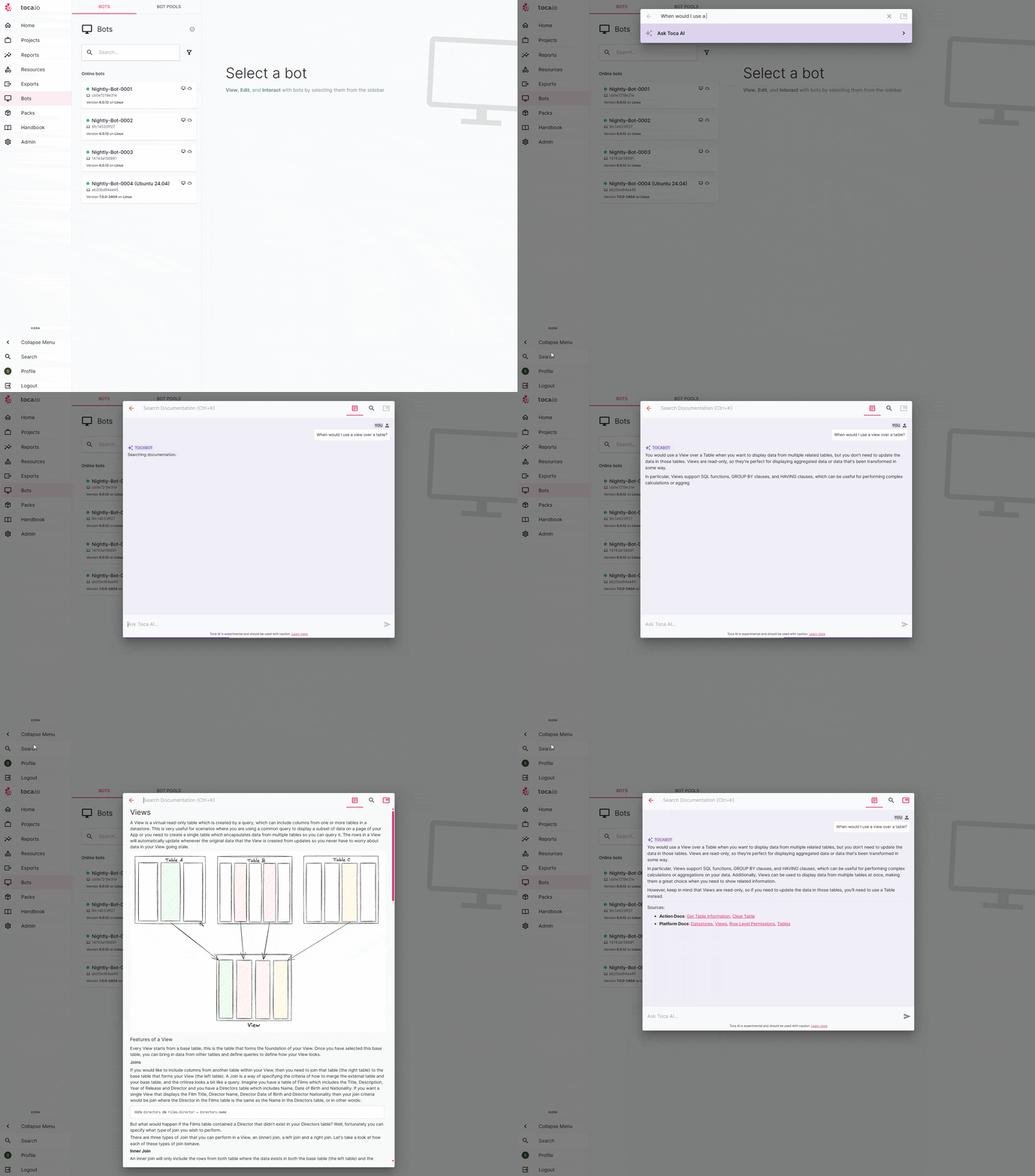
From raw documentation files across different sources to a fully orchestrated AI chat experience, we’ve walked through how Docs AI Search at Toca.io came to life. By combining a multi-layered retriever with carefully assembled prompts, we’ve built a feature that provides not just answers, but trustworthy, sourced information directly within the platform.
The result is a tool that we believe will make working with our documentation faster and more intuitive. We’re excited for you to try it in Toca 8.1 and would love to hear your feedback.
Note from the author
I mentioned this at the end of the last post, but it’s worth repeating:
The open-source ecosystem made this possible in ways that would have been unimaginable just a few years ago: Qdrant gave us production-ready vector search, LangChain handled the orchestration complexity, and Ollama let us run state-of-the-art language models on our own infrastructure. Because of these projects we were able to focus on what matters most: crafting an experience that truly serves our users.
This article was written by guest author Ben Emmons, a backend software developer at Toca.io.
Published on news.toca.io, 25 September 2025. Shown on toca.io.