
Blog ·
Docs AI Search is Coming to Toca.io
Hear from Ben Emmons on how we have built our new AI search feature, using open-source technology to provide users with direct, verifiable answers from their documentation.

Part 1 of 2: overview and indexing.
Starting in Toca 8.1, you’ll be able to ask questions about the Toca.io documentation in plain English. Instead of trawling through several articles to piece together how something works, you can simply ask a question and get a direct answer. Each answer comes with clickable sources, so you can see exactly where the information came from.
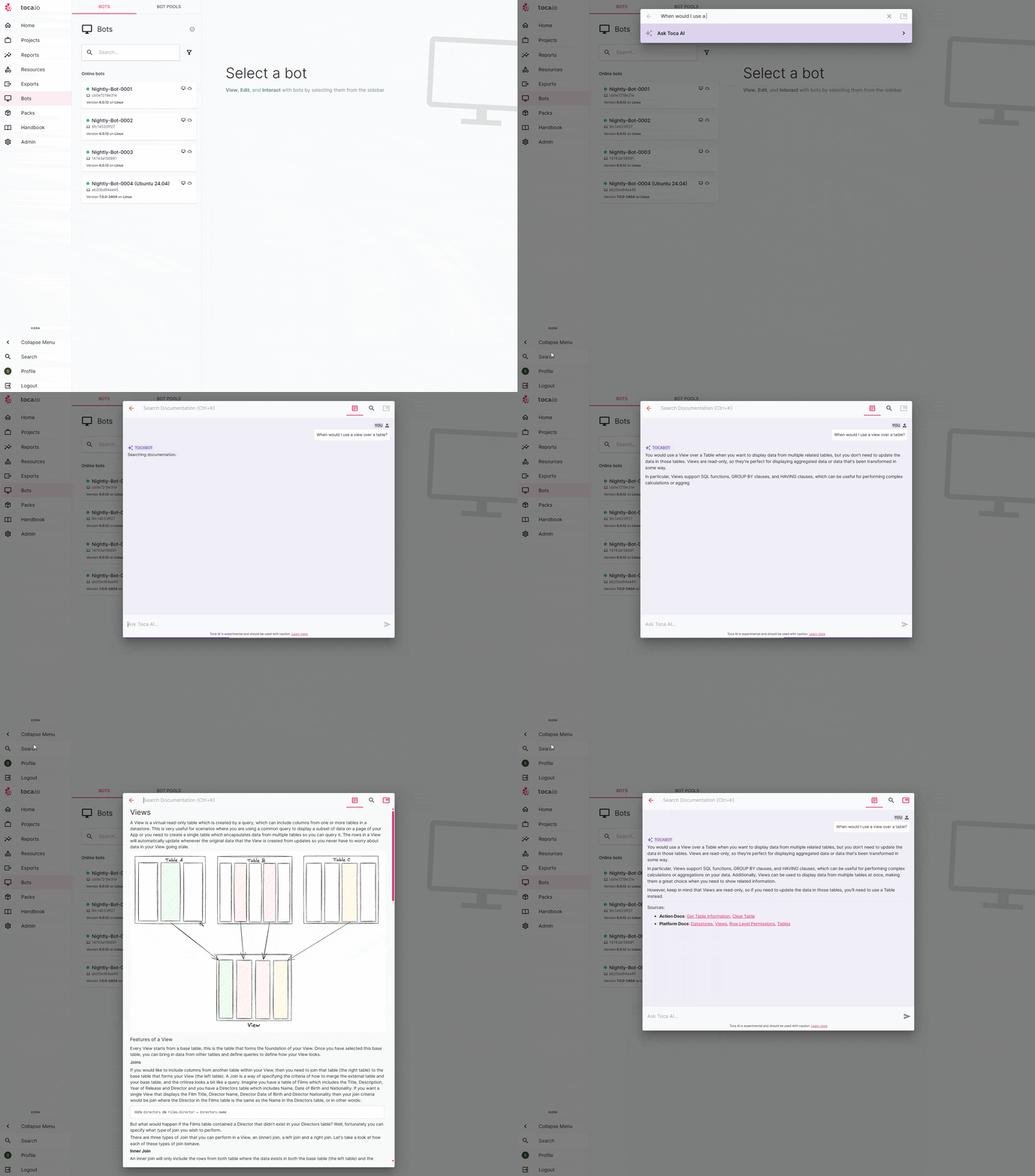
Building this feature pushed us to explore some powerful open-source technologies so, in the spirit of open source, for this week’s Tech Thursday we’re taking you behind the scenes to show how we put them together to implement Docs AI Search in the Toca platform.
Note: this is part 1 of a two-part series. In this post, we’ll cover our overall approach and how we brought different documentation sources together into a vector store that powers AI search. In part 2, we’ll cover how the AI uses those docs: prompting, message history and the other key pieces of the pipeline.
Defining the core experience and the tech stack
Before diving into the technical details, we settled on a set of principles to guide the project. We knew the final feature needed to be:
- 🗂️ Comprehensive. Users should be able to ask a question and get a single, cohesive answer drawn from our entire knowledge base, including platform documentation and the documentation of Toca entities like Actions, App Components, Connectors and so on.
- 🎯 Focused. The AI should act as a dedicated Toca expert. Its persona must be helpful and on-task, avoiding external information (except where appropriate) to provide trustworthy, relevant answers.
- 💬 Conversational. We must support back-and-forth interactions in conversation threads, as users have come to expect this from modern LLMs. It’s become second nature to many.
- 🔒 Secure and private. User privacy is non-negotiable. All processing has to happen on our own infrastructure, with zero calls to third-party services. This maintains the strict data security our users expect from Toca, allowing its use in secure, compliant environments.
- 🔍 Verifiable. To build trust, answers can’t be a black box. Every response must be backed by sources, so users can see the exact documentation used to generate it.
With these requirements defined, we began exploring the open-source ecosystem to find the right tools for the job. Although this may sound like a large undertaking, many open-source projects already address these kinds of challenges.
After much experimentation, we landed on a vector database (Qdrant), an orchestration framework (LangChain), and a self-hosted (Ollama) LLM (Llama 3.1), all tied together in the Toca.AI FastAPI Python service.
Here’s how we’re using them:
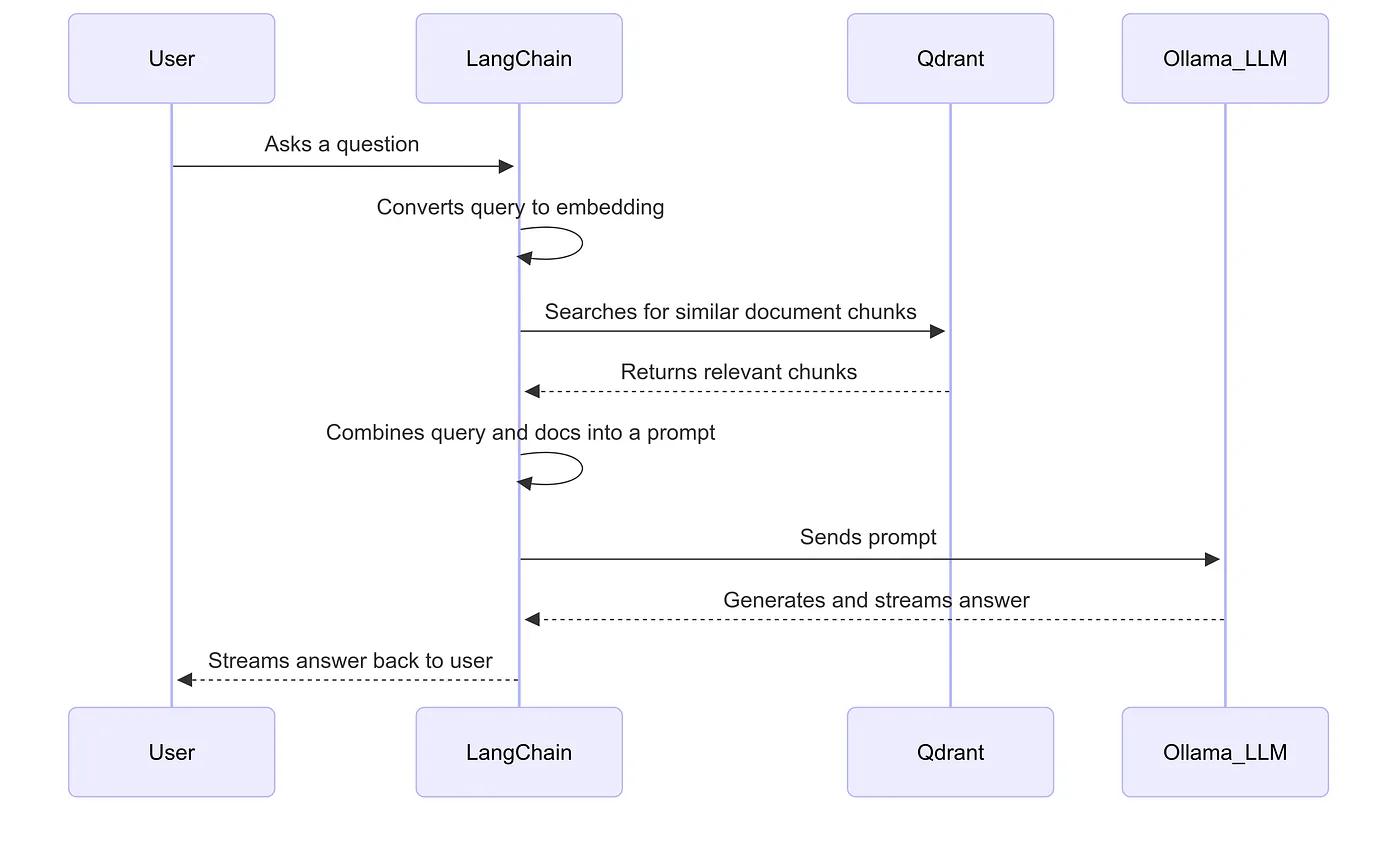
Qdrant (the semantic library 📚): Qdrant is our vector database, a specialised library for storing the meaning of our documentation, not just the words. It allows lightning-fast semantic searches, finding the most relevant documentation chunks even if they use different phrasing from the user’s question.
LangChain (the orchestrator 🧠): LangChain acts as the brain, orchestrating the entire workflow. It takes a user’s question, retrieves relevant documents from Qdrant, formats everything into a prompt, and sends it to our LLM to generate an answer. It’s the glue that connects all the components.
Ollama (the self-hosted AI ⚙️): Ollama runs the large language model (LLM) on our own infrastructure. By self-hosting with Ollama, we ensure user queries and our documentation never leave our environment, guaranteeing the security and privacy our users expect.
LangChain integrates nicely with both Qdrant (langchain-qdrant) and Ollama (langchain-ollama), which makes the integration seamless.
Ingestion and indexing
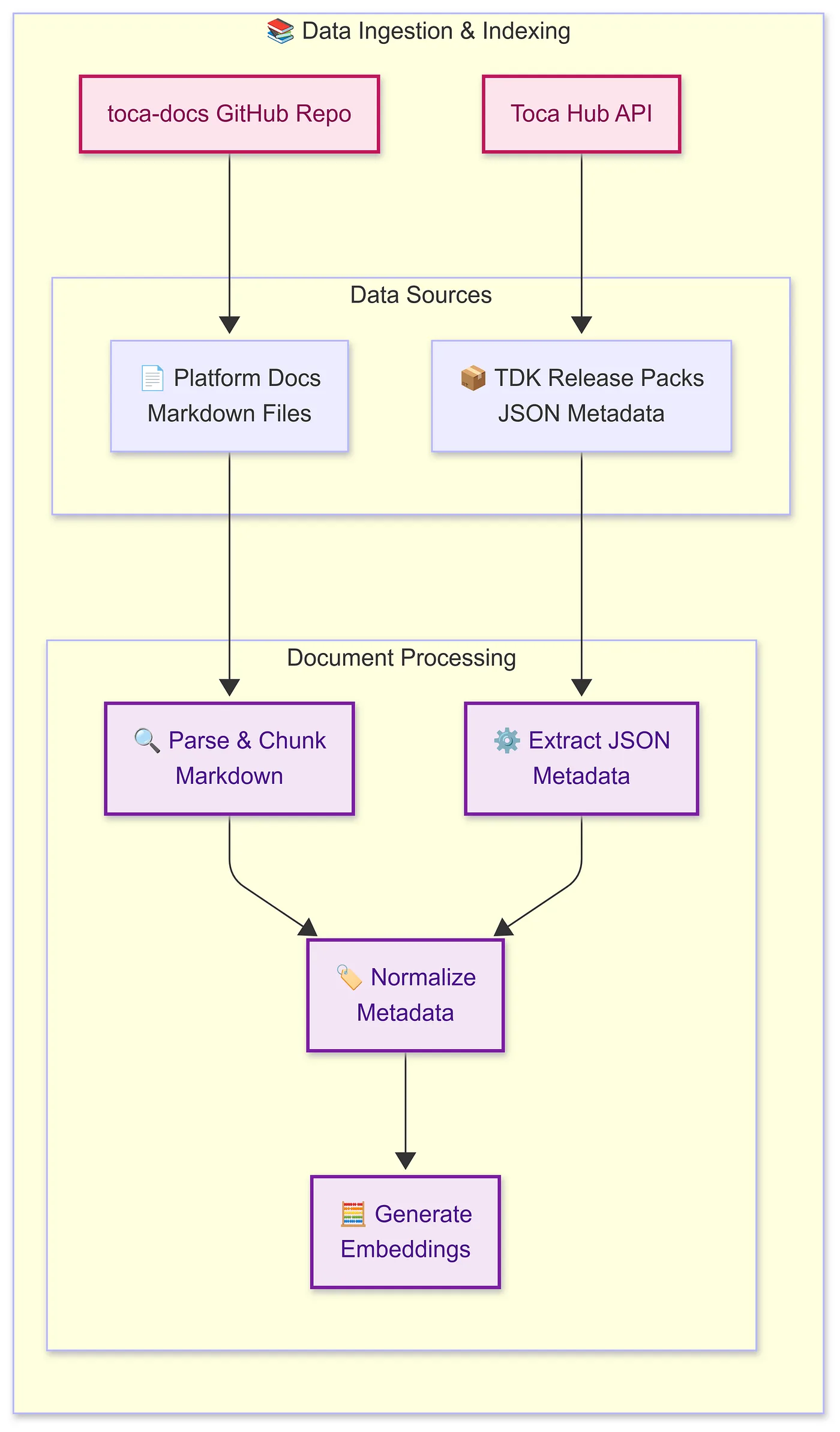
Before the AI can answer questions, it first needs to understand the documentation. This is where our ingestion and indexing pipeline comes in. Its job is to take all the raw content from our sources and prepare it so the language model can work with it effectively.
We rely on two main sources of documentation:
- The toca-docs GitHub repository: where all the documentation we display in the platform lives.
- Toca release packs: each release pack contains all the TDK entities for a given Toca release, like Actions, App Components and Connectors, along with their built-in documentation.
On start-up, we pull the Markdown doc files from these two sources (through the GitPython package and our API, respectively) and then create LangChain Document models from these files, using a chunking approach so that each chunk is small enough to stay relevant to the context (long articles can dilute an article’s meaning).
We experimented with various chunking strategies, like splitting after different heading levels or on a number of paragraphs, but settled on splitting on h1s (top-level headings). Splitting by paragraphs let the same long articles, made of long paragraphs, dominate the results, while splitting by headings gave a better balance across sources.
LangChain provides a variety of text splitters out of the box (HTML, JSON, Markdown and more), so for our use case it’s as simple as this:
from langchain.document_loaders import DirectoryLoader, TextLoader
from langchain.text_splitter import MarkdownHeaderTextSplitter

# Load markdown docs from the repository
loader = DirectoryLoader("src", glob="**/*.md", loader_cls=TextLoader)
docs = loader.load()
# Split each document by top-level headers
splitter = MarkdownHeaderTextSplitter(headers_to_split_on=[("#", "Header 1")])
chunk_documents = [chunk for doc in docs for chunk in splitter.split_text(doc.page_content)]
Once we’ve parsed and chunked the docs into LangChain Documents, the next step is to convert each chunk into an embedding and push it to Qdrant.
We ended up using Qwen3-Embedding-0.6B to generate and retrieve our embeddings, because in our testing it retrieved the relevant sources for user questions most often (and it dominates the MTEB embeddings leaderboard).
Side note: we also had great results with the much lighter nomic-embed-text 1.5 model, which is faster and runs with much less VRAM.
We run the following code on start-up to sync the documents to Qdrant. It creates a HuggingFaceEmbeddings instance of our Qwen3 embeddings model, configures it for either GPU or CPU depending on the hardware it detects, and sets the floating-point precision to torch.float16 (half) so as not to blow out the graphics card’s VRAM, while maintaining accuracy.
import torch
from langchain_community.embeddings import HuggingFaceEmbeddings

def setup_vectorstore(
    documents: list[Document],
    embedding_model: str | None,
    collection: str
) -> QdrantVectorStore:
    """
    Create embeddings and a vector store from the given documents.
    """
    device = "cuda" if torch.cuda.is_available() else "cpu"
    encode_kwargs = {"normalize_embeddings": True}

    embeddings = HuggingFaceEmbeddings(
        model_name=embedding_model,
        model_kwargs={
            "device": device,
            "torch_dtype": torch.float16,
        },
        encode_kwargs=encode_kwargs,
    )
    vectorstore = create_vector_store(
        documents=documents,
        embeddings=embeddings,
        collection=collection,
        embedding_batch_size=config.LLM.DOCS_CHAT.EMBEDDING_BATCH_SIZE,
    )
    logger.info("Toca Docs embeddings created successfully.")
    return vectorstore
We then create the vector store (Qdrant) and check whether anything has changed since the service last started; if nothing has, we exit early rather than running unnecessarily.
If anything has changed in the docs, we recreate the Qdrant collection, configure it, and push the documents to it in batches. The batching stops VRAM blowing out when there are lots of docs, though we did notice smaller embeddings models handling many thousands of docs without it.
from qdrant_client import QdrantClient, models as qdrant_models
from langchain_community.vectorstores import Qdrant as QdrantVectorStore

def create_vectorstore(
    documents: list[Any],
    embeddings: any,
    collection: str,
    embedding_batch_size: int
) -> QdrantVectorStore:
    """
    Creates or loads a Qdrant vector store from the provided documents.
    """
    client = QdrantClient(
        host=config.ENVIRONMENT.QDRANT_HOST,
        port=config.ENVIRONMENT.QDRANT_PORT,
    )
    if not is_dirty(client): # is_dirty is pseudocode, it's using GitPython under the hood
        logger.info("Qdrant collection is clean, skipping recreation.")
        return QdrantVectorStore(
            client=client,
            collection_name=collection,
            embedding=embeddings,
        )
    # Use embedding dimension to size the collection
    vector_size = len(embeddings.embed_query("test"))
    client.recreate_collection(
        collection_name=collection,
        vectors_config=qdrant_models.VectorParams(
            size=vector_size,
            distance=qdrant_models.Distance.COSINE,
        ),
    )
    vectorstore = QdrantVectorStore(
        client=client,
        collection_name=collection,
        embedding=embeddings,
    )
    num_batches = (len(documents) + embedding_batch_size - 1) // embedding_batch_size
    for i in range(0, len(documents), embedding_batch_size):
        batch = documents[i:i + embedding_batch_size]
        vectorstore.add_documents(batch)
        current_batch_num = (i // embedding_batch_size) + 1
        logger.info(f"Processed batch {current_batch_num} of {num_batches}")
    return vectorstore
Once all the start-up logic has completed (pulling docs and loading them into Qdrant), we can create a retriever to pull the docs relevant to a query, like so:
def _create_retriever(self, platform_version: str) -> BaseRetriever:
    """
    Creates a retriever for the specified platform version.
    """
    return self.vectorstore.as_retriever(
        search_type="similarity_score_threshold",
        search_kwargs={
            "score_threshold": config.LLM.DOCS_CHAT.VECTOR_STORE_SCORE_THRESHOLD,
            "filter": qdrant_models.Filter(
                must=[
                    qdrant_models.FieldCondition(
                        key="metadata.platform_version",
                        match=qdrant_models.MatchValue(value=str(platform_version)),
                    )
                ],
            ),
        },
    )
This implementation uses Qdrant’s filtering to create a separate retriever for each Toca platform version. That’s handy, as it lets us tailor the documents we pull back to those available on the user’s current version. Qdrant’s filtering capabilities are extensive and let you build some really powerful queries.
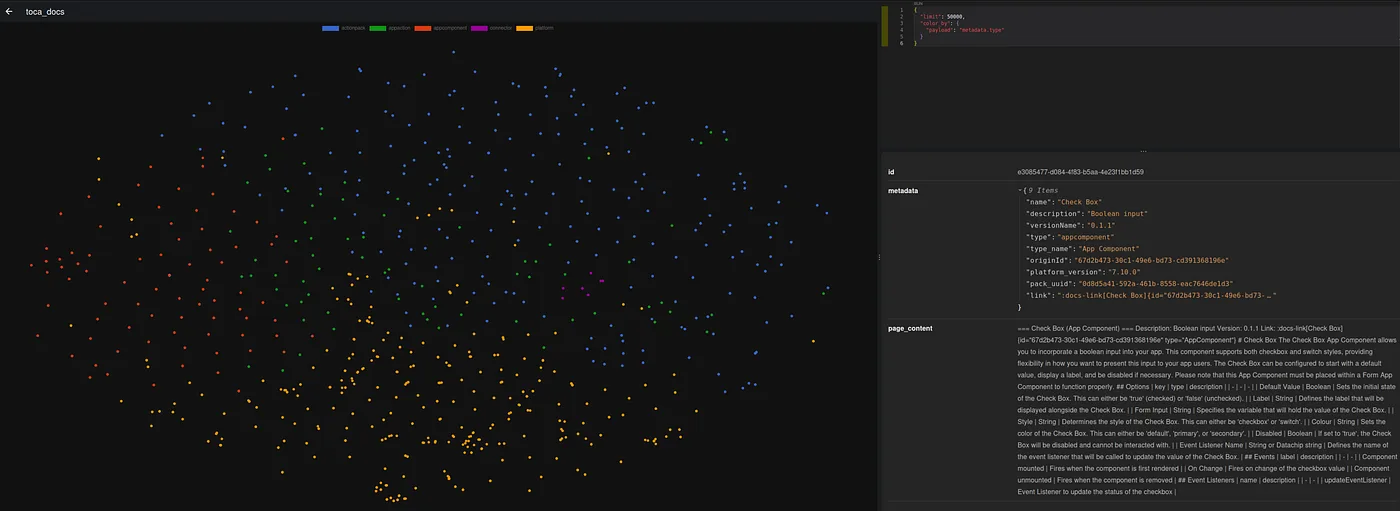
With this foundation in place, we have a complete ingestion and indexing pipeline that pulls documentation from multiple sources, chunks it into manageable pieces, generates embeddings, and stores them in Qdrant for fast semantic search. Our Docs AI service is ready to fetch the right information when a user asks a question.
We’ll use LangChain’s Qdrant integration to interface with the retriever for the actual feature (covered in part 2), but for now you can use this retriever as it is, like so:
retriever = self._create_retriever(platform_version="8.1")

query = "What's the difference between Connectors and Listeners?"
docs = retriever.get_relevant_documents(query)
for d in docs:
    print(d.metadata["source"], "→", d.page_content[:200], "...")
In the next post, we dive into how we use this indexed knowledge in practice: the Llama 3.1 prompt, handling conversation history, adding keyword and default docs, and orchestrating the full retrieval-augmented generation flow that powers Docs AI Search.
Final thoughts
The open-source ecosystem made this possible in ways that would have been unimaginable just a few years ago: Qdrant gave us production-ready vector search, LangChain handled the orchestration complexity, and Ollama let us run state-of-the-art language models on our own infrastructure. Because of these projects we were able to focus on what matters most: crafting an experience that truly serves our users.
This is just one small part of how AI is going to shape Toca from here. Keep your eyes peeled for more AI-powered features coming to the platform.
We’re excited to see how this changes the way you work with the Toca documentation, and we’d love your feedback once you try it. Did you enjoy this more technical breakdown of how we built a Toca feature? Let us know.
This article was written by guest author Ben Emmons, a backend software developer at Toca.io.
Published on news.toca.io, 4 September 2025. Shown on toca.io.